Shot Stamp
Turn photo folders into a clear handover — check dates, add labels and watermarks, then export JPEG copies with a contact sheet and photo index.
- Launched
- October 2026
- Last update
- October 2026
- Category
- Mac software
- Status
- Active
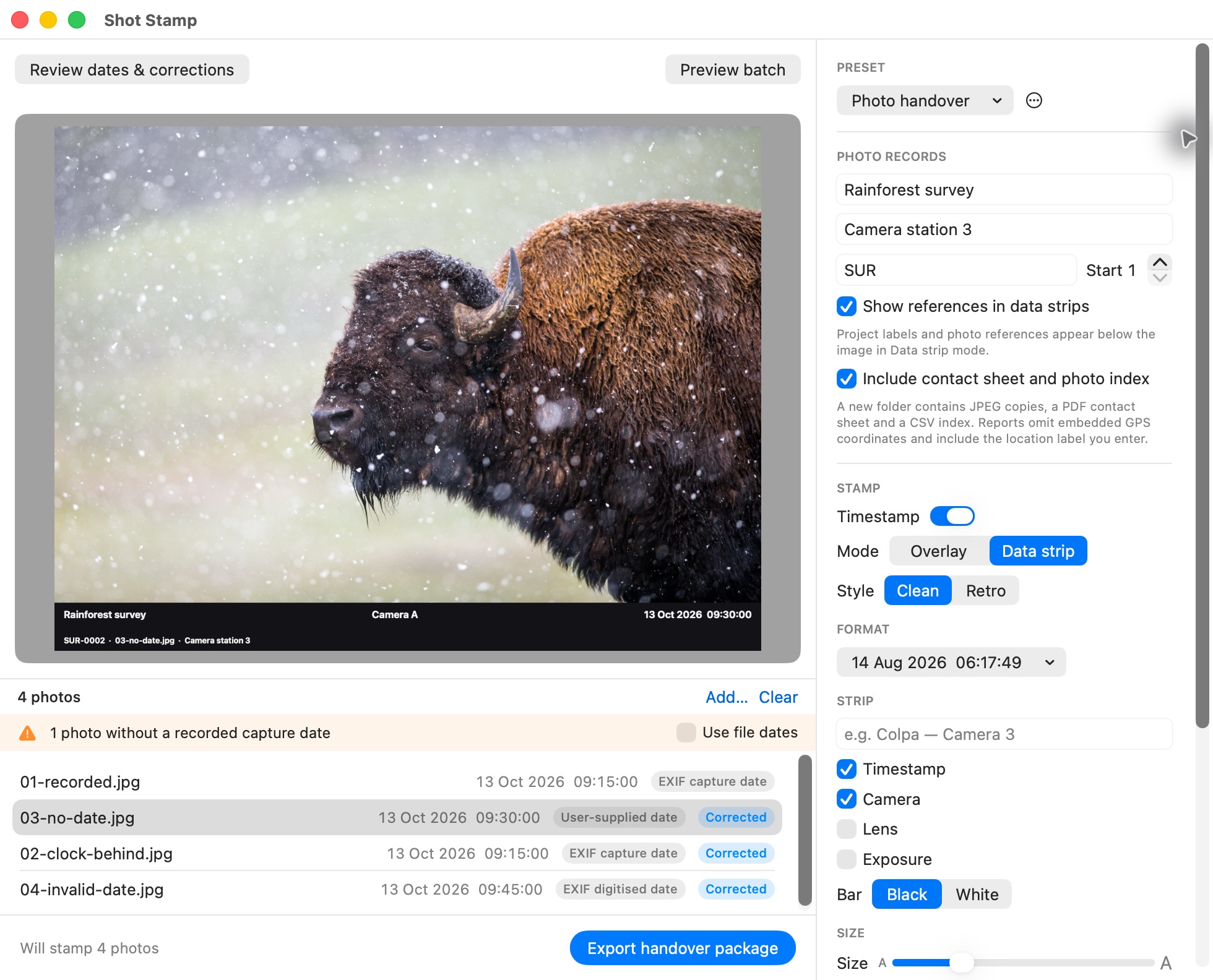
Turn a folder of photos into a clear handover. Shot Stamp lets you check camera dates, add project labels and numbered references, then export new JPEG copies with a PDF contact sheet and complete CSV index. Your originals stay unchanged.
Available now for Mac · Free · Version 1.1.0 · macOS 14+ · Apple silicon and Intel
Free Mac download · ShotStamp.com · Help and feedback · Privacy policy
Put the moment on the photograph
Drop in JPEG or HEIC photographs and folders, choose a timestamp style and check the result before exporting the batch. Place the date over the image or in a data strip beneath it, with available camera, lens and exposure details.
Use a clean modern timestamp or retro seven-segment digits. Adjust the position, size, colour and backing, then add a text watermark or transparent logo independently of the date. Save named presets for repeat jobs.
Check dates before you stamp
Review missing, invalid and conflicting capture dates alongside the original fields. Explicitly shift an incorrect camera clock or supply a date for a photo, folder, camera model or whole batch. Finder-date fallback is a separate option you choose. Representative previews help you check landscape and portrait results before export.
Corrections affect the stamps, filenames and reports. They do not rewrite the original photographs or the source date metadata retained in the exported JPEG copies. A supplied date or clock correction records your chosen adjustment; it does not establish when a photograph was taken.
Give every photo a reference
Add a project title, location label, original filename and numbered photo reference in a strip beneath the image. Use matching references in filenames so the photograph, contact sheet and index stay connected.
This is useful for field records, site visits, client proofs and archives where a clear photo set matters as much as an individual image.
Deliver the complete set
Export a new handover folder containing JPEG copies, Contact sheet.pdf and Photo index.csv. The complete index records original date fields, resolved dates, corrections and export outcomes, including skipped or failed photos. You can also export copies without reports.
The reports omit embedded GPS coordinates and absolute source paths. Project and location labels you type are included, so review them before sharing. Remove GPS location is an explicit option for the exported JPEG copies; report privacy alone does not remove GPS from those images. Originals keep their existing metadata.
Local processing, straightforward updates
Photos, metadata, project records and watermarks are processed locally on your Mac. There is no account, subscription, photo-upload service or app analytics. Presets and imported watermark images stay on your device.
The Mac app uses Sparkle for signed updates. Manual checks and any automatic checks or downloads you enable contact ShotStamp.com. Anonymous system profiling is disabled; photographs, project records and local filenames are not sent for updates. See the privacy policy for the separate handling of website requests and support messages.
Get Shot Stamp for Mac
Shot Stamp 1.1.0 is a free standalone Mac app, released on 14 October 2026. It requires macOS 14 or later and runs on Apple silicon and Intel Macs. It imports JPEG and HEIC and exports JPEG; RAW files, video and animated formats are not supported.
Download Shot Stamp for Mac, double-click the ZIP, then drag Shot Stamp into Applications. The app is Developer ID signed and notarized by Apple. macOS may show its normal first-open confirmation for a downloaded app.
For later releases, choose Shot Stamp → Check for Updates…, or open Settings to choose automatic checks and downloads.